¶ Laptop Setup Guide
College of Design · University of Kentucky
Last reviewed: July 24, 2026 · Maintained by: CoD Tech Help · Next review: December 2026
Plan ahead: Allow time for downloads, account verification, license requests, and checking that each required application opens successfully.
You'll need: stable Wi-Fi, your linkblue username and password, Duo on your phone, and a laptop that is plugged in.
Where to get help: CoD Tech Help — joe.brewer@uky.edu • Gray Design Building, Room 114 • UK ITS: 859-218-HELP (4357)
¶ Read before you buy a laptop
Check the College's current computer requirements before ordering. The required starting point is native 64-bit Windows 11, at least 32 GB of RAM, a 1 TB NVMe SSD, and a dedicated NVIDIA RTX graphics card with at least 8 GB of VRAM. The computer guidance page includes the remaining requirements and explains how to have an exact configuration checked.
Macs and Windows running virtually on a Mac do not meet the College requirement. Compatibility with one application does not establish compatibility with the software and workflows used across your courses. Access to a lab computer or a remote application does not change the purchase requirement.
Send an exact product link or final configuration screenshot to joe.brewer@uky.edu before purchasing. If you already own a computer, send its configuration so we can explain any gaps. Wait to buy software until your instructor or College technology staff confirms the application and license you need.
¶ Before you start
- Plug in your laptop and use a stable internet connection.
- Confirm your linkblue account and Duo work before beginning.
- Follow the account and license instructions for each service. University sign-in screens and software vendors may ask for different account details.
- Use the current guide linked for each service if a screen differs from older screenshots or instructions. Ask for help if you are unsure which account to use.
¶ Step 1 — Activate your linkblue and enroll in Duo
- Go to linkblue activation and complete the wizard. You will need the temporary password from your acceptance letter. (This replaces the older
newstudent.uky.eduaddress.) - Set a passphrase. UK moved to non-expiring passwords in January 2026, so pick something long and memorable rather than something short you will have to reset.
- Enroll a device in Duo multi-factor authentication. Enroll two devices if you can. A phone plus a tablet means a dead battery does not lock you out.
- Add a personal email and phone as recovery options in UK Account Manager. You will need this after you graduate.
- Note which University Email Address you chose. Some services require the
linkblue@uky.eduform specifically, not a friendly alias. Write down both.
Locked out? Call 859-218-HELP (4357). Password reset: reset.uky.edu
¶ Step 2 — Join campus Wi-Fi (eduroam)
Changed June 2026. UK adjusted the eduroam certificate process. If your laptop or phone connected to eduroam before mid-June, it may refuse to connect now. Forget the network and onboard again using the link below.
- Connect to a guest or personal network first so you can reach the onboarding page.
- Run the onboarding tool: How to Onboard Your Device to eduroam
- If onboarding does not work on your device, use the manual instructions for your platform:
- macOS: Manual · Onboarding
- Windows 10 and up: Connect to eduroam
- iOS / iPadOS: Manual · Onboarding
- Android: Manual · Onboarding
- When prompted for credentials, your username is
linkblue@uky.eduand the password is your linkblue password.
For current Wi-Fi assistance, use UK Wi-Fi help. Follow the University's onboarding instructions for your device.
¶ Step 3 — Install Microsoft 365 and set up OneDrive
- Go to office.com and sign in with your linkblue account.
- Choose Install apps → Microsoft 365 apps.
- Open Word and confirm you are signed in.
- Set up OneDrive and save a test document in your University OneDrive folder. Confirm that it finishes syncing. Use AutoSave where the application supports it.
Check current storage and collaboration details here: UK ITS Microsoft Office
The step-by-step install guide is in the UK Tech Help Center: Installing Microsoft 365 (KB0012178)
Important: OneDrive files are deleted when you leave UK, and personal OneDrive may not be recoverable after that point. Treat OneDrive as working storage, not as your archive. See Step 10.
¶ Step 4 — Install Adobe Creative Cloud
Follow the Adobe Creative Cloud guide for the current UK license request and sign-in instructions. Requesting access, installing the Creative Cloud desktop app, and having an active license are separate steps.
Install the applications your courses require. Open one after installation to confirm you can use it. If you see Trial or Buy, use the license troubleshooting section in the Adobe guide before purchasing a separate subscription. When asking for help, include the prompt you see and which account you used to sign in. Do not send passwords or verification codes.
¶ Step 5 — Install Rhino 8 (CAD)
Rhino is the core modeling tool across most of our programs.
- Check your hardware first. Use the College computer requirements. A software vendor's minimum requirements do not replace the College standard.
- Buy the educational license when your course requires it. Confirm the version your instructor uses and check current educational pricing with the seller.
- Direct from McNeel: Student and Faculty Order Form
- Authorized reseller: Novedge Rhino 8 Educational Student License
- Use a personal email address, not your UK address. The license does not expire and you will want it after graduation.
- Upload proof of enrollment when asked. A current class schedule or student ID works.
- About "shipping" status: there is no physical box. Your license key and download link arrive by email. Check spam.
- Install Rhino 8 from the emailed link and enter your key.
What you are buying. The educational license is the full commercial product, no watermark, no expiration, usable for commercial work. It is not transferable, and there is a limit of one per person.
One key, one platform at a time. A Rhino 8 key works on Windows or Mac, but not both simultaneously.
¶ Step 6 — V-Ray for Rhino (rendering)
macOS users, stop here. Chaos does not make a macOS version of V-Ray for Rhino. It installs on Windows only. If you have a Mac and need V-Ray, use a College lab machine or plan for a Windows computer. Do not buy the license expecting it to run on your MacBook.
Everyone: wait until your studio professor tells you that you need this. Many students do not need V-Ray in the first year, and the license is an annual term that starts ticking the day you buy it.
- Purchase the V-Ray Education Collection student license, which is a one-year term.
- Create a Chaos account. Chaos requires an educational email address for verification, so use your UK address here, and set a personal recovery email on the account.
- Verify your student status when prompted.
- Download V-Ray for Rhino and close Rhino before installing.
- Launch Rhino and sign in when V-Ray prompts you to authorize.
Check the current Chaos education offering for included products, eligibility, and renewal terms before purchasing.
¶ Step 7 — Install Twinmotion (real-time visualization)
Twinmotion is free for students. There is no longer a separate Education Edition, so everyone eligible runs the same build with no watermark and no resolution limits.
- Download and install the Epic Games Launcher.
- Create an Epic Games account. Use a personal email address. This is your account, not UK's, and there is no UK single sign-on for Epic.
- In the launcher, go to the Unreal Engine section and open the Twinmotion tab.
- Click Install, then launch Twinmotion.
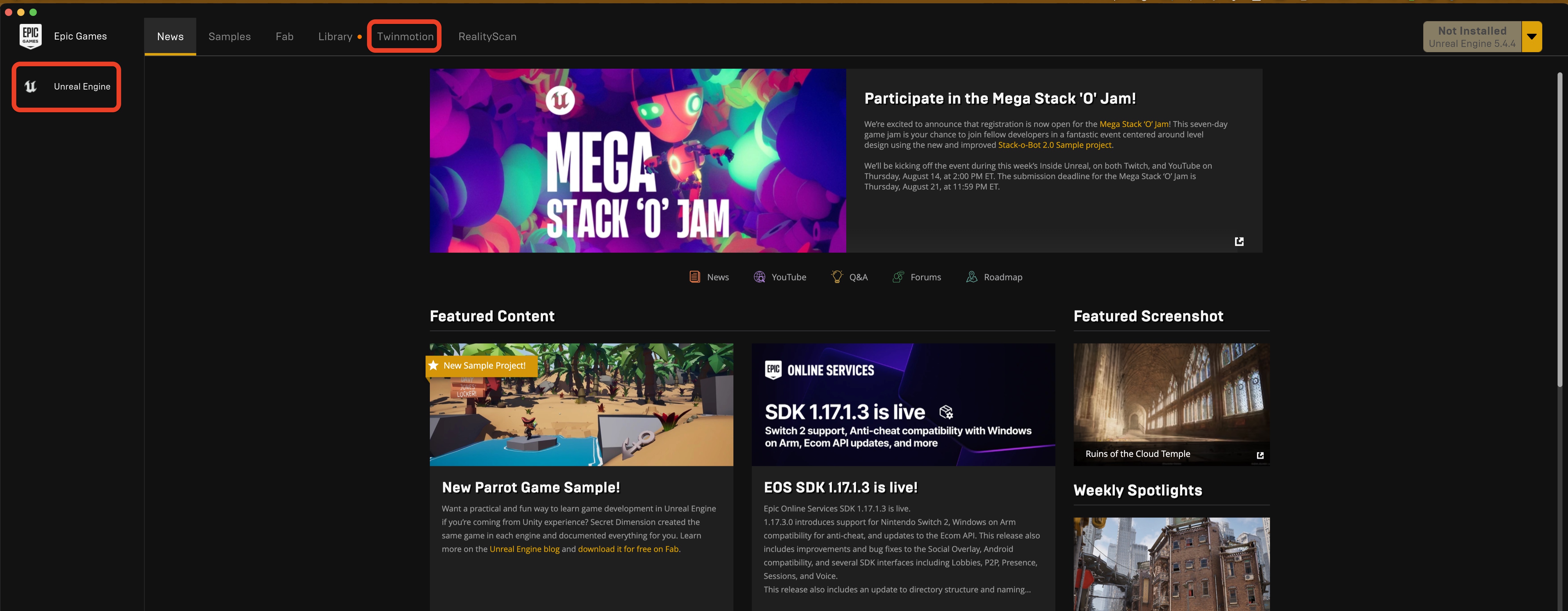
Use the College-compliant dedicated NVIDIA RTX graphics configuration. Check the current Twinmotion download and licensing information for feature availability.
¶ Step 8 — Print in the College of Design
We use PaperCut, but do not install the general UK version. Use the College of Design package.
¶ PaperCut Install Guide Wiki
Follow the guide for your platform, add the CoD printers, then run a test print before your first deadline, not the night of it.
Check your print balance any time at codprint.uky.edu.
Printing questions are the most common thing we get in Room 114 during the first three weeks. Come see us early.
¶ Step 9 — Autodesk (AutoCAD, Revit, Fusion, Forma)
These may or may not be required for your courses. Check your syllabus before installing.
- Go to Autodesk Education and follow the Students path.
- Create an Autodesk account. Use your UK email for verification, and add a personal email as a recovery address.
- Verify your student status. Autodesk uses a third-party verification service and may ask for enrollment documentation.
- Choose your products and install.
Mark your calendar now. Autodesk education access is a one-year term. Renewal opens 30 days before expiration and you must re-verify enrollment each year. If you let it lapse, you have to restart access rather than renew it, even if the software is still installed on your machine.
Check your course requirements before installing Revit. If your current computer cannot run a required application, discuss your options with College technology staff. A temporary access arrangement does not change the College computer requirements.
¶ Step 10 — Set up backup before you need it
Keep the editable project and a second copy in another location. Follow the computer guide's backup advice.
- Organize projects in course folders and check that any cloud copies have finished syncing.
- Keep a separate backup of the complete project folder, including linked images and textures.
- Save meaningful versions with names you can distinguish, such as
2026-FA_ARC201_ProjectName_v03. - Keep exported presentation files alongside the editable source. Reopen a sample from the backup to confirm that you can recover your work.
¶ Step 11 — Nice-to-have essentials
- OneDrive: turn on AutoSave in Word, Excel, and PowerPoint.
- Microsoft Teams: good for group projects. Files stored in a Team survive after an individual leaves UK. Files in personal OneDrive do not.
- Virtual Den: Read the current UK service guidance for available applications and access. Availability of remote software does not make a noncompliant laptop meet the College requirement.
- Student Tech Help @ The Hub: walk-up support, basement of William T. Young Library.
- Canvas: uk.instructure.com
- Software downloads: download.uky.edu
¶ Checklist
¶ Accounts and preparation
- Activate linkblue, set a passphrase, enroll two devices in Duo
- Add recovery email and phone in UK Account Manager
- Onboard to eduroam using the ITS onboarding tool
- Install Microsoft 365 and turn on OneDrive AutoSave
- Follow the Adobe guide to request UK access.
¶ Install and verify
- Install Adobe Creative Cloud, sign in as
linkblue@uky.edu, install your core apps - Buy and install Rhino 8 using a personal email address, then activate with the emailed key
- Install Twinmotion via the Epic Games Launcher
- Download and install CoD PaperCut from the PaperCut Install Guide Wiki, add printers → test a print
- Install Autodesk programs (if needed), and note your renewal date
- Check your print balance at codprint.uky.edu
¶ Later, when required
- V-Ray for Rhino, only after your studio professor confirms you need it, and only on Windows
¶ Common failures, fast fixes
| What you see | What it means | What to do |
|---|---|---|
| eduroam will not connect | Certificate process changed in June 2026 | Forget the network, run the ITS onboarding tool in Step 2 |
| Adobe says "not entitled" or shows Trial / Buy | Access or account needs checking | Follow the current Adobe guide before purchasing a subscription |
| Adobe rejects your email | Sign-in needs checking | Use the account instructions in the Adobe guide and include the exact prompt if asking for help |
| Rhino crashes immediately on a new laptop | Several causes are possible | Check the computer requirements and troubleshooting guidance; send your hardware details and exact error |
| No V-Ray installer for Mac | It does not exist | V-Ray for Rhino is Windows-only |
| Rhino order says "shipping" | Nothing ships | Check your email and spam for the license key |
| Autodesk stopped working after a year | Term expired | Re-verify enrollment and restart access |
| Printer not listed | Wrong PaperCut package | Uninstall, use the CoD package from the wiki |
¶ Before you graduate
Do this in your final semester, not after.
- Migrate Adobe files to a personal Adobe ID. Your UK Adobe account is deactivated when you leave.
- Move everything out of OneDrive. Personal OneDrive is deleted and may not be recoverable.
- Confirm your Rhino license is registered to a personal email address. If it is on your UK address, change it now while you can still receive mail there.
- Update the email on Chaos, Epic, and Autodesk accounts.
- Set an external recovery email in UK Account Manager so you can request documentation later.
- Read UK's Account Offboarding guidance.
¶ Need help?
College of Design Tech Help
Gray Design Building, Room 114 · joe.brewer@uky.edu
UK ITS Customer Services
24/7 urgent: 859-218-HELP (4357)
Online support: techhelpcenter.uky.edu
Non-urgent requests: techhelpcenter.uky.edu/assistance
1:1 walk-up: Student Tech Help @ The Hub, W.T. Young Library basement
You've got this. Welcome to the College of Design — we're excited you're here!